
How Mapdate Works: The Complete Guide
A complete step-by-step guide to Mapdate — from setting up your profile to sending your first Spark. Learn every feature of the map-based dating app.
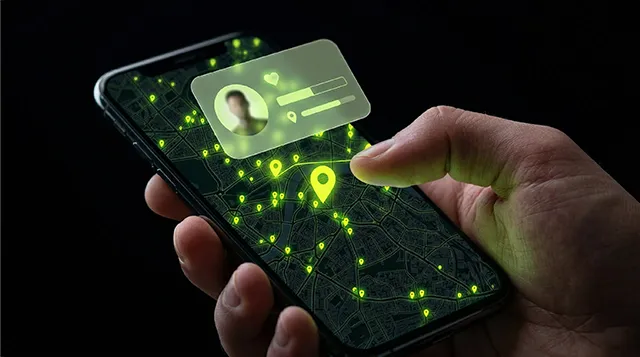
Mapdate is a location-based dating app built around a live interactive map. Instead of swiping through an endless stack of profiles, you open a map and see people around you right now. This guide covers every feature — from sign-up to Premium — so you know exactly how to get the most out of it.
Getting Started
01
Download the app
Mapdate is available on the App Store (iOS 12.0+) and Google Play (Android 7.0+). Download is free.
02
Create your account
Sign up with an email address or use an external login. Your display name is what others see — you can change it anytime in your profile settings.
03
Enable location services
Mapdate needs location access to show you people nearby. On iOS, go to Settings > Mapdate > Location. On Android, go to Settings > Apps > Mapdate > Permissions > Location. Without location, the map doesn’t work.
04
Build your profile
Add up to several photos (JPG/PNG, up to 20MB each). Write a bio, list your interests, and complete your profile interview. Strong profiles get significantly more engagement — don’t skip this step.
The Live Map: Your Main Interface
Open Mapdate and the first thing you see is a map showing your area. Anonymised markers represent people nearby who are also using the app. You can:
- Zoom in and out to explore different areas
- Tap a marker to view that person’s profile, photos, and current Story
- Filter by criteria (age, gender, interests) — with more filters available on Premium
- See at a glance how many people are active in your immediate area right now
Privacy note: Your exact GPS coordinates are never shown to other users. Mapdate shows your general area, not your precise location. You control how visible you are in the app settings.
Moves: How Liking Works
To express interest in someone, you use Moves. Think of a Move as a like — you spend one to indicate interest in a profile.
- Free users get a daily allocation of Moves to browse and like profiles
- If someone likes you back, you match and a private chat opens automatically
- Premium users get unlimited Moves, so you never have to wait for your daily reset
Sparks: Skip the Wait
Sometimes you don’t want to wait for a mutual match. That’s what Sparks are for.
A Spark lets you connect and open a chat with someone immediately , without needing them to have liked you first. It’s the Mapdate equivalent of walking up to someone and saying hello — direct, confident, no algorithm in the way.
Sparks are available as individual purchases or as part of the Extra Features bundle.
Stories: Show Your Current Vibe
Unlike a static profile photo, a Story is ephemeral content — photo, video, or audio — that captures what you’re feeling or doing right now. Stories appear on the map alongside your profile marker, giving nearby users a live signal of who you are today, not just a curated highlight reel.
- Stories are a powerful way to attract attention from people nearby
- Other users can reply directly to your Story to start a conversation
- Content must follow Community Guidelines — inappropriate material will be removed
The Public Hub
The Public Hub is Mapdate’s community layer — a space for city-wide conversations visible to all local users. It’s halfway between a social feed and a town square.
Participating in the Public Hub is one of the best ways to build visibility and get noticed in your area without waiting for a direct match. It lowers the social barrier: a reply to someone’s public post is much easier than a cold first message.
All the Features at a Glance
🗺️
Interactive Map
Explore your area and see who’s nearby in real time. Zoom, filter, tap to view profiles.
⚡
Sparks
Connect and chat instantly without waiting for a mutual match.
📸
Stories
Share your current mood — photo, video, or audio. More authentic than a static bio.
💬
Public Hub
Join local conversations and build visibility in your city.
🎙️
Voice Notes
Send voice messages in chat. More personal than text, less pressure than a call.
🏆
Popularity Points
Earn points through interactions. Climb the Rewards dashboard for seasonal perks.
🔍
Advanced Search
Filter by age, gender, interests, and more. Full filters available with Premium.
🚀
Boosts & Flashes
Extra Features that increase your profile visibility on the map for a set period.
Premium Membership
Mapdate’s free tier gives you genuine access to the core experience. Premium unlocks the full feature set:
- Unlimited Moves — no daily limit on liking profiles
- Advanced search filters — find exactly who you’re looking for faster
- Instant messaging — message without waiting for a match in certain contexts
- Profile visitor details — see who viewed your profile
Premium is available as a 1-month, 3-month, or 6-month subscription. Go to Account > Settings > Premium Pass in the app to subscribe.
Safety on Mapdate
Mapdate takes safety seriously. A few key points:
- Never share personal financial information with anyone on the platform
- Mapdate will never ask for financial details via the chat
- Report inappropriate profiles or photos using the report icon on any profile or image
- You can disconnect from someone at any time from their profile
- Exact location is never shared — only general area
For full safety guidance, see our Community Guidelines and Privacy Policy.
Frequently Asked Questions
Have more questions? The full FAQ covers everything from password resets and billing to photo guidelines and account deletion.
See it for yourself.
Mapdate is free to download. Live map, real people, real connections.
Keep reading
-
Best Dating Apps in 2026: An Honest Comparison
An honest, no-PR comparison of the best dating apps in 2026 — what each one is actually good for, who it's right for, and where each one falls short.
-

30 First Date Questions That Aren't Boring (And 10 to Avoid)
First date conversation can be brutal if you fall back on the standard questions. Here are 30 first-date questions that actually create connection — and the 10 that kill it.
-
20 Second Date Ideas That Build on the First One
First dates filter for chemistry. Second dates build on it. Here are 20 second-date ideas that level up from coffee-and-questions to actually getting to know someone.